Fixing Git Commit Attribution on GitHub
My GitHub profile showed no activity after a full day of commits. The cause was an old Git identity, and fixing it meant understanding what Git stores, what GitHub checks, and when rewriting history is worth the risk.


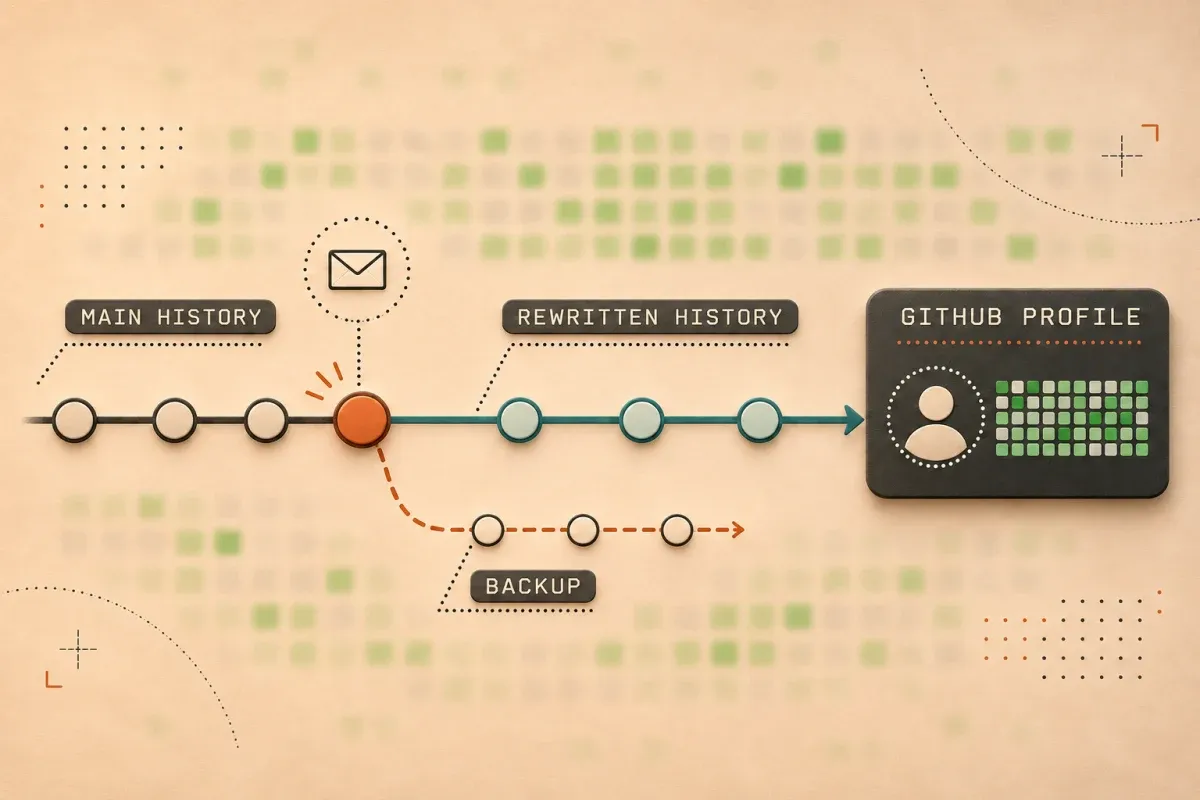
I had been committing all day, but my GitHub profile showed no activity. It turned out that Git was still stamping my commits with a name and email I had used years earlier, back in my Bitbucket days.
The confusing part is that pushing code and getting credit for a commit are separate things. Your GitHub login lets you authenticate and push. Each Git commit also stores an author name and email, and GitHub uses the email in that metadata to link a commit to an account. Changing a username or login does not rewrite old commits. GitHub explains the email matching here.
Check the commit identity first
Before changing history, I would check both what Git is configured to use and what is already stored in a commit:
git config --show-origin --get-regexp '^user\.(name|email)$'
git log --all --format='%h author=%an <%ae> committer=%cn <%ce>' | sort -u
git show -s --format=fuller <commit-sha>
The first command shows configured user.name and user.email values, including where each setting came from. The log shows both author and committer identities in reachable commits. git show lets you inspect one commit in more detail. I find this useful because the setting for the next commit and the metadata in an old commit are two different things.
Then check that the author email is connected to your GitHub account, and that the commit is on the repository’s default branch (or gh-pages for a project site). Commits on other branches count after they are merged into the default branch; work in a fork counts after a pull request is merged upstream. A qualifying commit can also take up to 24 hours to appear. GitHub’s missing-contributions guide lists these conditions.
If the old email is yours and you are comfortable keeping it associated with your account, adding it to GitHub may be enough. For future commits, set the identity you want Git to use. I prefer a repository-level setting when projects need different identities. For a while, I had several work accounts and a personal one, and that is how the confusion started: I did not check which identity a repository was using.
git config user.name "Your Name"
git config user.email "[email protected]"
GitHub documents both global and repository-level email settings in its commit email guide. Check the values again before the next commit.
When I would rewrite old commits
Rewriting history is an exception. I would consider it only when the historical metadata itself needs to change and a normal email-account fix does not meet the goal. In my case, I chose to correct old commit identities too.
That changes commit IDs. A commit’s ID depends on its metadata, so descendants also receive new IDs when an earlier commit changes. A force push replaces the remote branch history; collaborators’ existing clones and branches still refer to the old commits. They need to coordinate a re-clone or carefully realign their local work. Open pull requests and other refs may need separate attention.
I used git-author-rewrite.md as a prompt for an AI assistant while working through the rewrite. The AI gave me one command at a time; I ran each command manually, reviewed the output, and decided whether to continue. I like keeping control, especially when a command can change shared history. The prompt broke the work into checks, backup, rewrite, verification, and a separate remote update. I used git-filter-repo to change the history. I kept my original local copy and created a backup branch on the remote before touching the history. Its documentation recommends starting from a fresh clone and warns that rewriting is an irreversible operation in that working copy. The project’s manual explains the fresh-clone check and rewrite workflow.
The prompt starts by checking whether the old commit email can simply be connected to GitHub. If a rewrite is still needed, it asks the AI to confirm the branch and identity pairs, inspect collaborators and open pull requests, preserve a backup at the exact remote commit, and verify the rewritten author and committer data before any force push. It treats the remote update as a separate decision and waits for my approval. Most importantly for me, it does not run commands on my behalf: I run each one and review its output before moving on.
I published a reusable version of the prompt with a generic mailmap template in this public Gist. The AI prompt is the first file; authors.mailmap.example shows the mapping format without exposing anyone’s real email. I keep the direct link here as a fallback for readers whose email client does not display script embeds.
Before the command-by-command procedure, here is the decision path I followed.
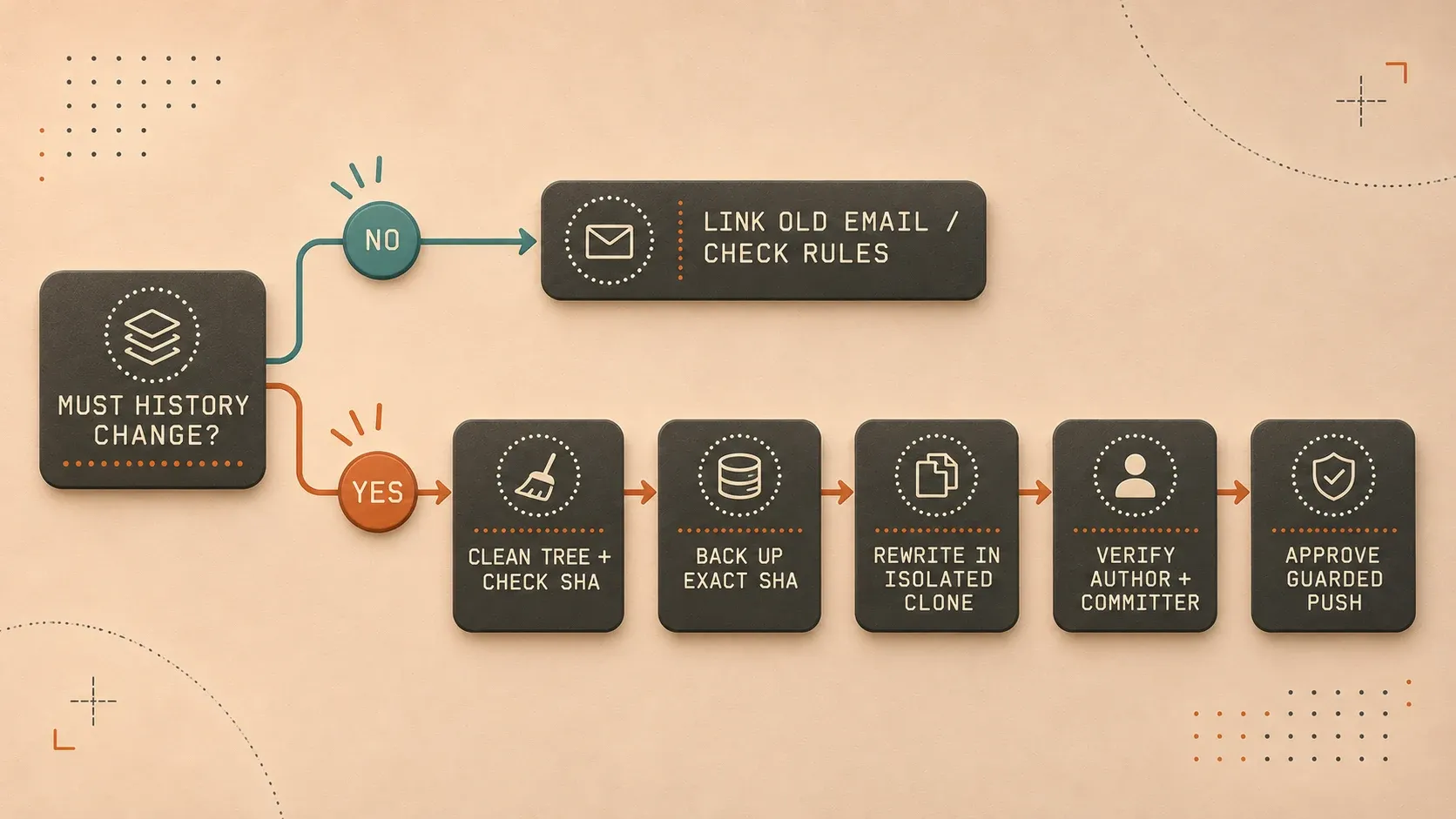
A cautious example for one branch
The commands below use main as the target branch. Replace it if your repository uses another name. This example rewrites only that branch; if other branches or tags also need correction, plan them separately.
Before creating the backup, make sure the working tree is clean and your local branch matches the remote branch. The rewrite clone will be created from the remote, so a backup made from a stale local main could preserve a different history. Check git status and stop if you have uncommitted changes; then fetch the remote refs, compare the two SHAs, and stop if they do not match:
git status
git switch main
git fetch origin
git rev-parse main
git rev-parse origin/main
Once they match, create the backup from origin/main, push it, and record the remote tip and commit count:
git branch backup-before-author-fix origin/main
git push origin backup-before-author-fix
git fetch origin
git rev-parse origin/main
git rev-parse origin/backup-before-author-fix
git rev-list --count origin/main
Confirm that the two SHAs match, then save that SHA and the commit count. If they differ, stop: the remote branch moved or the backup does not point to the expected commit. Keep the original local clone as another copy. Then create a fresh, single-branch clone; the backup branch stays outside this rewrite. Confirm that the new clone starts at the SHA you saved before running the rewrite:
git clone --single-branch --no-tags --branch main <repository-url> author-rewrite
cd author-rewrite
git rev-parse main
If this SHA differs from the saved one, stop and check whether the remote moved before continuing.
Create a mailmap file next to the clone, for example ../authors.mailmap. Add one line for each old identity, mapping it to the name and email you want to keep. git-filter-repo applies these mappings to both author and committer names and emails. These are placeholders; use the exact old values from your repository, and do not publish private addresses in an article or public gist.
Correct Name <[email protected]> Old Name <[email protected]>Install git-filter-repo using its installation instructions, then rewrite the clone:
git filter-repo --mailmap ../authors.mailmapBefore pushing, inspect the rewritten history and compare the commit count with the original. Confirm that the old identities are gone and that the intended commits remain. The filter may remove the origin remote as a safety measure, so add it again only after reviewing the result:
git log main --format='%h author=%an <%ae> committer=%cn <%ce>' | sort -u
git rev-list --count main
git remote add origin <repository-url>
Finally, replace <original-main-sha> with the SHA you saved before rewriting. This explicit lease allows the push only if the remote branch still points to the tip you reviewed. If someone pushed in the meantime, the command should stop; coordinate first instead of forcing over their work.
git push --force-with-lease=refs/heads/main:<original-main-sha> origin mainAfter the rewrite, tell collaborators what changed and agree on how they should update their clones. I would leave the remote backup branch in place until everyone has confirmed the new history works for them. GitHub says repository contributor statistics may take about 24 hours to refresh after a force push; profile attribution still depends on its contribution rules. GitHub documents the delay here.
Check the next repository before committing
My simple habit now is to check the commit identity as soon as I start work in a new repository:
git config user.name
git config user.email
It takes a moment. It is much easier than deciding later whether old history is worth rewriting.
Before rewriting yours, ask one question: can linking the existing commit email to your GitHub account solve the problem? If it can, there may be no reason to replace the history.